一、vim安装插件管理器
早期的vim插件需要在网站下载,然后复制到对应目录.(https://www.vim.org/scripts/index.php)
受益于github的发展,用插件管理器(一般使用plug.vim)可以批量自动安装和更新插件。非常方便。
git clone https://github.com/junegunn/vim-plug
,然后复制 plug.vim 到vim目录下的 autoload目录就完成了。
二、vim配置文件
1.vimrc位置目录
vimrc是vim的总配置文件,windows下为vimrc,linux/macos为.vimrc。
一般位于$HOME目录。启动vim,命令行输入:echo $HOME,就可以显示。在此目录下建立vimrc或者.vimrc文件。
2.vimrc内容
此配置适用macos,其他系统需要少量适配,如果不使用golang,对应插件用"号注释就可以。
配置中有简要说明.详细介绍请参考github或者本blog其他文章。
filetype off                  " required
syntax on
"安装 plug插件管理器
"curl -fLo ~/.vim/autoload/plug.vim --create-dirs https://raw.githubusercontent.com/junegunn/vim-plug/master/plug.vim
"然后运行:PlugInstall ,如果遇到下载失败按键R重新执行

call plug#begin('~/.vim/plugged')
Plug 'fatih/vim-go'
Plug 'buoto/gotests-vim'

Plug 'maralla/completor.vim'
Plug 'preservim/tagbar'
" 快速注释,自动检测语法
Plug 'preservim/nerdcommenter'
" 文件管理插件
Plug 'preservim/nerdtree'
Plug 'Xuyuanp/nerdtree-git-plugin'
"Plug 'ryanoasis/vim-devicons'
"git状态显示
Plug 'airblade/vim-gitgutter'
"Plug 'mhinz/vim-signify'
"文件查找
Plug 'kien/ctrlp.vim'
"文本搜索
Plug 'dkprice/vim-easygrep'
"颜色风格
Plug 'tomasr/molokai'
"括号自动补全
Plug 'Townk/vim-autoclose'
"Plug 'Valloric/YouCompleteMe'
"代码模版快速生成
Plug 'SirVer/ultisnips'
Plug 'honza/vim-snippets'
"代码自动补全
Plug 'Shougo/neocomplete.vim'
"历史文件增强 :browse oldfiles
Plug 'gpanders/vim-oldfiles'
" markdown 插件
Plug 'godlygeek/tabular'
Plug 'plasticboy/vim-markdown'
call plug#end()

" 判断系统是否具有“自动命令”(autocmd)的支持
"if has('autocmd')
" 清除所有的自动命令,以方便调试
"au!
" 对于后缀为“.asm”的文件,认为其是微软的 Macro Assembler 格式
" autocmd FileType ruby,eruby set omnifunc=rubycomplete#Complete
"endif
" 载入文件类型插件
filetype plugin indent on
filetype plugin on
" 为特定文件类型载入相关缩进文件
filetype indent on
" colorscheme railscasts
" colorscheme fruidle
" colorscheme gemcolors
"let g:rehash256 = 1
"let g:molokai_original = 1
colorscheme molokai
" colorscheme night
" colorscheme twilight
"语法样式开启
syntax on
"set shell='/bin/bash'
"设置字体及大小,需要根据系统字体调整
set gfn=Menlo:h16
":set guifont=Menlo:h13
" set guifont=Monospace\ 12
" set guifont = Courier\   14
" set guifont=Bitstream_Vera_Sans_Mono:h10:cANSI
"set guifontwide=KaiTi\ 14
"set gfw=幼圆:h10.5:cGB2312

" Set to auto read when a file is changed from the outside
set autoread
"
" With a map leader it's possible to do extra key combinations
" like <leader>w saves the current file
 let mapleader = ","
 let g:mapleader = ","
"
" Fast saving
nmap <leader>w :w!<cr>
set softtabstop=4
set expandtab
"行间距,如果默认值太小,代码会非常纠结
set linespace=4
"用<>调整缩进时的长度
set shiftwidth=4
""""""""""""""""""""""""""""""
" => Visual mode related
" """"""""""""""""""""""""""""""
" " Visual mode pressing * or # searches for the current selection
" " Super useful! From an idea by Michael Naumann
vnoremap <silent> * :call VisualSelection('f')<CR>
vnoremap <silent> # :call VisualSelection('b')<CR>
" history文件中需要记录的行数
set history=600
" 带有如下符号的单词不要被换行分割
" set iskeyword+=_,$,@,%,#,-
" 高亮显示普通txt文件(需要txt.vim脚本)
"au BufRead,BufNewFile *  setfiletype txt
" 自动切换文件目录
au BufEnter * if expand("%:h")!=""|cd %:h|endif

"不需要保持和 vi 非常兼容
set nocompatible
"执行 Vim 缺省提供的 .vimrc 文件的示例,包含了打开语法加亮显示等最常用的功能
"source $VIMRUNTIME/vimrc_example.vim
" 使backspace正常处理indent, eol, start等
set backspace=indent,eol,start whichwrap+=<,>,[,]
" 允许backspace和光标键跨越行边界
set whichwrap+=<,>,h,l
"在输入命令时列出匹配项目,也就是截图底部的效果
set wildmenu
"打开自动缩,继承前一行的缩进注释 进
set autoindent
"默认情况下手动折叠
set foldmethod=manual
"显示行号(否:nonumber)
set number
"显示光标的坐标
set ruler
" 设置光标闪烁
"set guicursor=n-c-v:ver50-ncvCursor,-blinkwait175-blinkoff150-blinkon175
"set guicursor=n-c-v:hor50-Cursor-ver50-Cursor-blinkwait175-blinkoff650-blinkon350
set guicursor=n-c-v:blinkwait100-blinkoff500-blinkon500
"set guicursor=n-c-v:ver50-blinkwait175-blinkoff150-blinkon175
"不自动换行(否:wrap)
" set nowrap
"缺省不产生备份文件
set nobackup
" 不要生成swap文件
set noswapfile
"set bufhidden=hide
"在输入括号时光标会短暂地跳到与之相匹配的括号处,不影响输入
set showmatch
" 匹配括号高亮的时间(单位是十分之一秒)
set matchtime=1
" 搜索时不区分大小写
" set ignorecase
" 在搜索时,输入的词句的逐字符高亮(类似firefox的搜索)
set incsearch
" 搜索高亮
set hlsearch
" 不要闪烁
set novisualbell

" Set 7 lines to the cursor - when moving vertically using j/k
set so=7
"正确地处理中文字符的折行和拼接
set formatoptions+=mM
"文件编码自动检测
set fileencodings=utf-8,gb18030,ucs-bom,euc-cn,euc-tw,cp936
"设置文件格式为unix
set fileformat=unix
"当使用了图形界面,并且环境变量 LANG 中不含“.”(即没有规定编码)时,把 Vim 的内部编码设为 UTF-8
"set encoding=utf-8
" set fileencodings=utf-8,gb2312,cp936
"set fileencodings=utf-8,gbk,cp936
"TAB会被显示成 '>—" 而行尾多余的空白字符显示成 '-"
" set listchars=tab:>-,trail:-
set list listchars=tab:>-
"开启命令显示
set showcmd
" Don't redraw while executing macros (good performance config)
set lazyredraw
"设置窗口大小
"set lines=35
"set columns=120
" 启动的时候不显示那个援助索马里儿童的提示
set shortmess=atI
" 导出 html 设置
"let html_use_css = 1
"let html_number_lines = 0
"let use_xhtml = 1
" Smart way to move between windows
 map <C-j> <C-W>j
 map <C-k> <C-W>k
 map <C-h> <C-W>h
 map <C-l> <C-W>l
 "Remap VIM 0 to first non-blank character
 map 0 ^
"
" " Move a line of text using ALT+[jk] or Comamnd+[jk] on mac
 nmap <M-j> mz:m+<cr>`z
 nmap <M-k> mz:m-2<cr>`z
 vmap <M-j> :m'>+<cr>`<my`>mzgv`yo`z
 vmap <M-k> :m'<-2<cr>`>my`<mzgv`yo`z
"
 if has("mac") || has("macunix")
   nmap <D-j> <M-j>
   nmap <D-k> <M-k>
   vmap <D-j> <M-j>
   vmap <D-k> <M-k>
 endif

"隐藏底部滚动条
set guioptions-=b
"隐藏右边滚动条
set guioptions-=R
set guioptions-=r
"隐藏左边滚动条
set guioptions-=l
set guioptions-=L
"隐藏菜单栏
set guioptions-=m
"隐藏工具栏
set guioptions-=T

"设置F2呼出菜单栏
"function! ToggleMenuBar()
"	echo 'ToggleMenuBar"
"	if &guioptions =~# 'm'
"		set guioptions-=m
"	else
"		set guioptions+=m
"	endif
"endfunction
"imap <silent> <C-F12> <C-O>:call ToggleMenuBar()<CR>
"map <silent> <C-F12> :call ToggleMenuBar()<CR>

"设置工作目录
"function! CHANGE_CURR_DIR()
"let _dir = expand("%:p:h")
"exec 'cd ' . _dir
"unlet _dir
"endfunction
"autocmd BufEnter * call CHANGE_CURR_DIR()

" NERDTree插件的快捷键
nn <silent> <F5> :NERDTreeToggle<CR>
"自动启动nerdtree
autocmd VimEnter * NERDTree | wincmd p
":browse oldfiles 插件增强
nmap <leader>b <Plug>(Oldfiles)
" F2 通过打开的文件对齐树形目录
nn <silent><F2> :exec("NERDTree ".expand('%:h'))<CR>
" Check if NERDTree is open or active,打开的文件自动定位目录
function! IsNERDTreeOpen()
  return exists("t:NERDTreeBufName") && (bufwinnr(t:NERDTreeBufName) != -1)
endfunction
" Call NERDTreeFind iff NERDTree is active, current window contains a modifiable
" file, and we're not in vimdiff
function! SyncTree()
  if &modifiable && IsNERDTreeOpen() && strlen(expand('%')) > 0 && !&diff
    NERDTreeFind
    wincmd p
  endif
endfunction
" Highlight currently open buffer in NERDTree
autocmd BufEnter * call SyncTree()

function! ToggleNerdTree()
  set eventignore=BufEnter
  NERDTreeToggle
  set eventignore=
endfunction

"CTRL-[ and CTRL-] indent and unindent blocks {{{
"  inoremap <C-[> <C-O><LT><LT>
" inoremap <C-]> <C-O><GT><GT>
"  nnoremap <C-[> <LT><LT>
"  nnoremap <C-]> <GT><GT>
"  vnoremap <C-[> <LT>
"  vnoremap <C-]> <GT>
"}}}

" NERD Commenter {{{
"let NERDSpaceDelims = 1
"map <M-/> <Plug>NERDCommenterToggle
"imap <M-/> <C-O><Plug>NERDCommenterToggle
" }}}

" 窗口区域切换,F5 后 ↑↓←→  来切换
"imap <silent> <C-left> <esc><C-W><left>
"vmap <silent> <C-left> <esc><C-W><left>
"nmap <silent> <C-left> <C-W><left>
"imap <silent> <C-right> <esc><C-W><right>
"vmap <silent> <C-right> <esc><C-W><right>
"nmap <silent> <C-right> <C-W><right>
"imap <silent> <C-up> <esc><C-W><up>
"vmap <silent> <C-up> <esc><C-W><up>
"nmap <silent> <C-up> <C-W><up>
"imap <silent> <C-down> <esc><C-W><down>
"vmap <silent> <C-down> <esc><C-W><down>
"nmap <silent> <C-down> <C-W><down>

" Textmate alt-p & alt+l {{{
"inoremap <M-p> params[:]<left>
"inoremap <M-j> session[:]<left>
"inoremap <M-l> <space>=><space>
"inoremap <M->> <%=<space><space>%><left><left><left>
" shift+alt+l 选择行
"inoremap <M-L> <C-O><home>v<S-end>
"nnoremap <M-L> <home>v<S-end>
" shift+alt+k 删除行
"inoremap <M-K> <C-O><home>v<S-end><del>
"nnoremap <M-K> <home>v<s-end><del>
" ctrl + c,a,v,x,z
"nnoremap <BS> d
" ctrl + a
noremap <C-A> ggVG
inoremap <C-A> <C-O>ggVG
" ctrl + s

"imap <C-s> <Esc>:w<CR>:echo expand(%f") . ' saved."<CR>
"vmap <C-s> <Esc>:w<CR>:echo expand(%f") . ' saved."<CR>
"nmap <C-s> :w<CR>:echo expand(%f") . ' saved."<CR>

" ctrl + n
"imap <C-n> <esc>:enew!<CR>
"nmap <C-n> :enew!<CR>
"vmap <C-n> <esc>:enew!<CR>
" ctrl + c
"vmap <C-c> "+y
" ctrl + x
" vmap <C-x> "+x
" ctrl + z
"inoremap <C-z> <C-O>u
inoremap <C-z> u
nnoremap <C-z> u
" ctrl + y
"inoremap <C-y> <C-O><C-R>
"nnoremap <C-y> <C-R>
" ctrl + v
nnoremap <C-v> "+gP
inoremap <C-v> "+gP
"inoremap <C-v> <C-O>"+gP
" ctrl + f
"imap <C-f> <esc>:/
"nmap <C-f> :/
" ctrl + r
"imap <C-r> <esc>:%s/
"vmap <C-r> <esc>:%s/
"nmap <C-r> :%s/
" ctrl + o
"imap <C-o> <C-O>:e
"vmap <C-o> <esc>:e
"nmap <C-o> :e
"}}}

" 自定义命令
"command Delnullrow :%s/^\n$//g
" 自动完成设置 禁止在插入模式移动的时候出现 Complete 提示
let g:acp_mappingDriven = 1
" 自动除去空格
" Remove trailing whitespace when writing a buffer, but not for diff files.
" %s/^\n$//g  删除两个以上空行
" From: Vigil
"function RemoveTrailingWhitespace()
"    if &ft != 'diff'
"        let b:curcol = col(".")
"        let b:curline = line(".")
"        silent! %s/\s\+$//
"        silent! %s/\(\s*\n\)\+\%$//
"        call cursor(b:curline, b:curcol)
"    endif
"endfunction
"autocmd BufWritePre * call RemoveTrailingWhitespace()
" 括号自动补全
":inoremap ( ()<ESC>i
":inoremap ) <c-r>=ClosePair(')')<CR>
":inoremap { {}<ESC>i
":inoremap } <c-r>=ClosePair('}')<CR>
":inoremap [ []<ESC>i
":inoremap ] <c-r>=ClosePair(']')<CR>
":inoremap < <><ESC>i
":inoremap > <c-r>=ClosePair('>')<CR>

"function ClosePair(char)
"    if getline('.')[col('.') - 1] == a:char
"        return '\<Right>'
"    else
"        return a:char
"    endif
"endf
" go 1.0.3
" gocode 配置 gocode status确认是否启动
set completeopt=longest,menu
" gocode 自动补全 快捷键冲突 所以设置为 ctrl+h
"imap <C-h> <C-x><C-o>
imap <C-h> <C-x><C-o>

" go 相关的快捷键 格式化 gofmt
":map <F9> <Esc>:w<CR>:!gofmt -s -w %<CR>:e %<CR>
":imap <F9> <Esc>:w<CR>:!gofmt -s -w %<CR>:e %<CR>
":map  <F9> <Esc>:w<CR>:!gofmt -s -w %<CR>:e %<CR>
"autocmd BufWritePre,FileWritePre *.go  ks|execute ':w'|execute ':!gofmt -s -w %'|execute ':e %'|execute 'source ~/.vimrc'|'s
"autocmd BufWritePre,FileWritePre *.go  ks|execute ':w'|execute ':!gofmt -s -w %'|execute ':e %'|'s
"autocmd BufWritePost *.go  execute ':!gofmt -s -w % '|execute ':e %'
"autocmd BufWritePre *.go  execute ':!gofmt -s -w % '|execute ':e %'
":map <F9> <C-s>:!gofmt -s -w %<CR>:e %<CR>
""""""""""""""""""""""""""""""""""""""""""""""""""""""""""""""""""""""""""""""""
"设置在c文件保存时自动格式化
""调用命令是 au BufWritePost *.c :call FormatC()
function! FormatGo()
  "execute ':w'
  execute ':!gofmt -s -w %'
    edit
    syntax enable
endfunction
" go 相关的快捷键 编译和运行 go run
" au BufWritePost *.go :call FormatGo()
:imap <F9> <Esc>:w<CR>:!go run %<CR>
:map <F9> <Esc>:w<CR>:!go run %<CR>
":imap <F10> <Esc>:!go run %<CR>
":map <F10> <Esc>:!go run %<CR>
":imap <F9> <Esc>:w<CR>:!go test<CR>
":map <F9> <Esc>:w<CR>:!go test<CR>
":imap <F8> <Esc>:!go test<CR>
":map <F8> <Esc>:!go test<CR>
":imap <F7> <Esc>:!go install<CR>
":map <F7> <Esc>:!go install<CR>
nmap <F8> :TagbarToggle<CR>
let g:tagbar_width=25
let g:tagbar_type_go = {
    \ 'ctagstype' : 'go',
    \ 'kinds'     : [
        \ 'p:package',
        \ 'i:imports:1',
        \ 'c:constants',
        \ 'v:variables',
        \ 't:types',
        \ 'n:interfaces',
        \ 'w:fields',
        \ 'e:embedded',
        \ 'm:methods',
        \ 'r:constructor',
        \ 'f:functions'
    \ ],
    \ 'sro' : '.',
    \ 'kind2scope' : {
        \ 't' : 'ctype',
        \ 'n' : 'ntype'
    \ },
    \ 'scope2kind' : {
        \ 'ctype' : 't',
        \ 'ntype' : 'n'
    \ },
    \ 'ctagsbin'  : 'gotags',
    \ 'ctagsargs' : '-sort -silent'
\ }

" shortcuts to make it easier to jump between errors in quickfix list:
map <C-n> :cnext<CR>
map <C-m> :cprevious<CR>
nnoremap <leader>o :copen<CR>
nnoremap <leader>oo :cclose<CR>

au FileType go nmap <Leader>i <Plug>(go-info)
au FileType go nmap <Leader>gd <Plug>(go-doc)
au FileType go nmap <Leader>gv <Plug>(go-doc-vertical)
au FileType go nmap <Leader>gb <Plug>(go-doc-browser)

au FileType go nmap <leader>r <Plug>(go-run)
"au FileType go nmap <leader>b <Plug>(go-build)
" au FileType go nmap <leader>t <Plug>(go-test)
au FileType go nmap <leader>t <Plug>(go-test)
" au FileType go nmap <leader>t <Plug>(go-test-compile)
" au FileType go nmap <leader>c <Plug>(go-coverage)


au FileType go nmap gd <Plug>(go-def)
au FileType go nmap gc <Plug>(go-callers)
au FileType go nmap gf <Plug>(go-referrers)
au FileType go nmap gs <Plug>(go-implements)
au FileType go nmap <Leader>ds <Plug>(go-def-split)
au FileType go nmap <Leader>dv <Plug>(go-def-vertical)
au FileType go nmap <Leader>dt <Plug>(go-def-tab)


"Rename the identifier under the cursor to a new name
au FileType go nmap <Leader>e <Plug>(go-rename)

au FileType go nmap <leader>l <Plug>(go-lint)

let g:UltiSnipsExpandTrigger="<tab>"

"let g:UltiSnipsJumpForwardTrigger="<c-b>"
"let g:UltiSnipsJumpBackwardTrigger="<c-z>"
"Disable opening browser after posting to your snippet to play.golang.org:
"let g:go_play_open_browser = 0
""By default vim-go shows errors for the fmt command, to disable it:
"let g:go_fmt_fail_silently = 1
""Enable goimports to automatically insert import paths instead of gofmt:
let g:go_fmt_command = "goimports"
"let g:go_term_enabled=0
"let g:go_term_enabled = 1
"let g:go_term_mode='split'
"let g:go_term_reuse = 1
"let g:go_term_mode='vsplit'
"let g:go_term_mode='tab'
"let g:go_term_close_on_exit = 1
"let g:go_test_show_name = 1

"Disable auto fmt on save:
let g:go_fmt_autosave = 1
let g:go_autodetect_gopath = 1
let g:godef_split=2
let g:go_list_type = "quickfix"
"let g:UltiSnipsJumpBackwardTrigger="<c-z>""
let g:go_highlight_types = 1
let g:go_highlight_extra_types = 1
let g:go_highlight_fields = 1
let g:go_highlight_function_calls = 1
let g:go_highlight_functions = 1
let g:go_highlight_methods = 1
let g:go_highlight_structs = 1
let g:go_highlight_operators = 1
let g:go_highlight_build_constraints = 1
let g:go_highlight_generate_tags = 1
let g:go_version_warning = 1

"let g:go_def_mode='gopls'
"let g:go_info_mode='gopls'
" Enable lsp for go by using gopls
let g:completor_filetype_map = {}
let g:completor_filetype_map.go = {'ft': 'lsp', 'cmd': 'gopls -remote=auto'}

let g:go_metalinter_enabled = ['vet', 'golint', 'errcheck']

"By default binaries are installed to $GOBIN or $GOPATH/bin. To change it:
""let g:go_bin_path = expand("~/.gotools")
""snippet 代码模板参考
"https://github.com/honza/vim-snippets/blob/master/snippets/go.snippets""
"  If you would like JSX in .js files
let g:jsx_ext_required = 0
" md keyboard"
let g:mkdp_path_to_chrome = "open -a Google\\ Chrome"
 "MarkdownPreview
     " 在打开 markdown 文件后,使用该命令可以打开预览窗口
     "
     "     MarkdownPreviewStop
     "         " 关闭 markdown 预览窗口,并停止开启的服务进程
" gitgutter
let g:gitgutter_preview_win_floating = 1
"autocmd BufWritePost * GitGutter
set updatetime=500
"markdown
let g:vim_markdown_folding_disabled = 1
三、安装插件
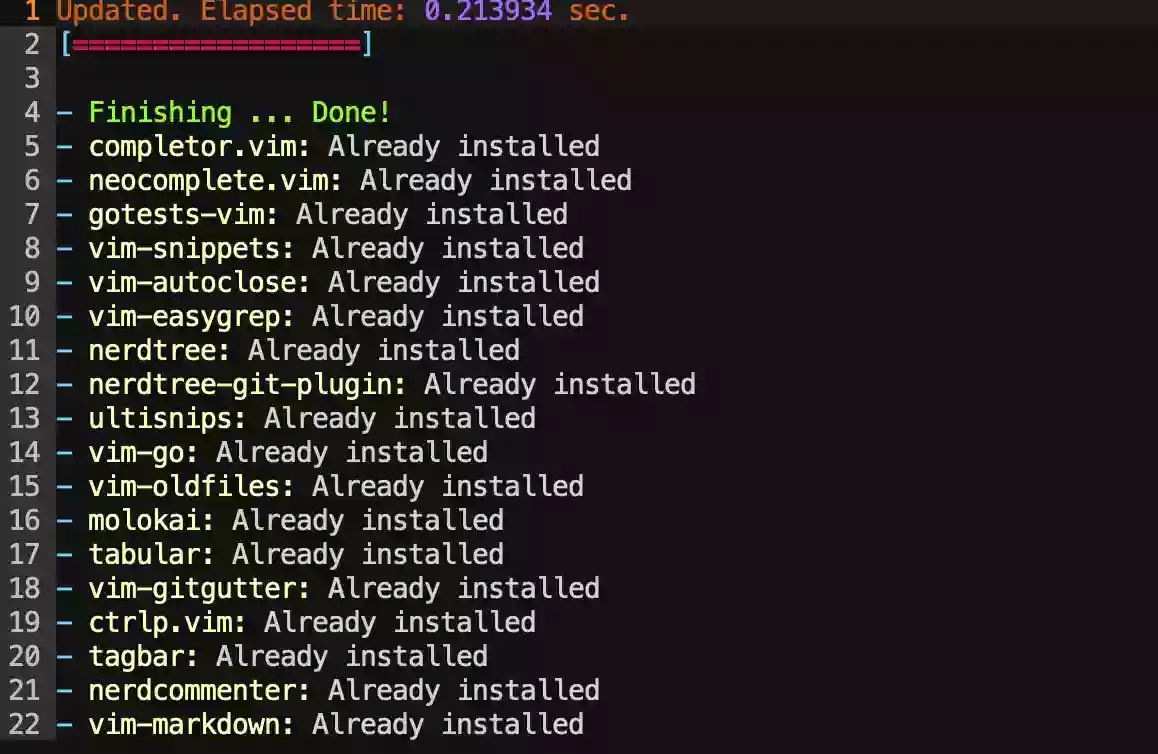
命令行模式:PlugInstall, 耐心等待结果,部分失败的话,大写R键(shift+r) 重新安装,直至呈现下图: