说明
Hammerspoon 是一款革命性的 macOS 桌面自动化工具,它将系统级 API 与灵活的 Lua 脚本引擎相结合。通过编写自定义的 Lua 脚本,您可以对系统进行强大的控制。
程序员一般的工作习惯都是两个显示屏幕,两个浏览器窗口,多个编程编辑器窗口,再加至少一个即时通讯工具,或者还有一个终端console。如果使用系统快捷键切换不够精确,用鼠标又不方便,特别是需要把光标移到扩展的显示屏的时候。Hammerspoon作为一个专业的macos自动化工具可以带领很大的方便。
- 如果快捷键不起作用,切换输入法为英文.
- 以下快捷键,里面有“+”号,表示分段,不代表键盘,先按前面部分,在1秒内再按后面部分。
- vscode版本:1.80.1. 安装了golang,vim插件。macos 12.6.
- https://github.com/Hammerspoon/hammerspoon
环境
- Macos 14
- Hammerspoon 1.0.0
安装
- 官方连接 https://github.com/Hammerspoon/hammerspoon
- 参考说明,下载dmg文件安装或者brew安装均可。
默认功能快捷键
- ⌘+
,为tab键上面的按键。弹出来一个选择窗口,如下: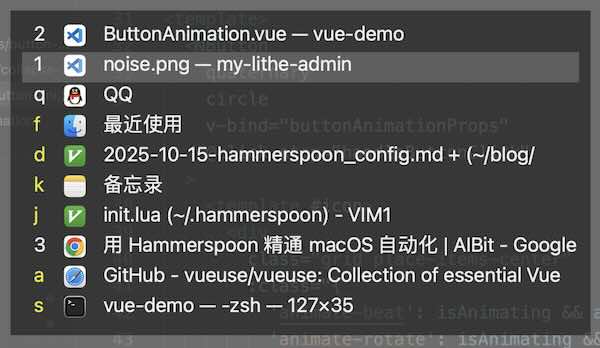
- 再按数字或者字母,即可切换到对应的窗口。
自定义功能快捷键
- 点击右上角🔨图标,选择 “open config",可以自己写lua脚本。再次选择 “reload config”即可生效。
- lua脚本功能可参考github官网.
- 以下是我个人实现的一些功能,比如鼠标光标在主显示屏和扩展屏之间切换, vscode多个窗口循环切换等。
- 两个全屏 VSCode 窗口 = 两个独立的 macOS Space;
- macOS 不提供任何 API(也不允许 AppleScript)激活另一个全屏 App 窗口;
- tell application “Code” to activate 只会激活 当前所在的 Space;
- 所以,想要多开vscode,必须在配置文件中 加上 “window.nativeFullScreen”: false 。设置后,vscode左上角的全屏按钮会变成+号。
local hotswitchHs = require("hotswitch-hs/hotswitch-hs")
-- hotswitchHs.enableAutoUpdate() -- If you don't want to update automatically, remove this line.
--hotswitchHs.setAutoGeneratedKeys({"1", "2", "3", "4", "5", "6", "7", "8", "9", "0"})
hotswitchHs.enableAllSpaceWindows()

--hs.application.enableSpotlightForNameSearches(true)

--hs.hotkey.bind({"command"}, "`", hotswitchHs.openOrClose) -- Set a keybind you like to open HotSwitch-HS panel.
hs.hotkey.bind({"command"}, "\\", hotswitchHs.openOrClose) -- Set a keybind you like to open HotSwitch-HS panel.

-- 使用【Option+tab】在不同屏幕之间移动鼠标
-- option==alt
hs.hotkey.bind({'option'}, 'tab', function()
local screen = hs.mouse.getCurrentScreen()
local nextScreen = screen:next()
local rect = nextScreen:fullFrame()
local center = hs.geometry.rectMidPoint(rect)
hs.mouse.absolutePosition(center)
end)

-- 使用【Option+W】在不同屏幕之间移动窗口
hs.hotkey.bind({'option'}, 'W', function()
-- get the focused window
local win = hs.window.focusedWindow()
-- get the screen where the focused window is displayed, a.k.a. current screen
local screen = win:screen()
-- compute the unitRect of the focused window relative to the current screen
-- and move the window to the next screen setting the same unitRect
win:move(win:frame():toUnitRect(screen:frame()), screen:next(), true, 0)
end)


--hs.hotkey.bind({'alt'}, 'q', function() openApp("notion") end)
--hs.hotkey.bind({'alt'}, 'v', function() openApp("Visual Studio Code") end)i
-- 绑定快捷键:Alt + V
-- VSCode 窗口循环切换逻辑
-- 快捷键绑定 (⌥ + ⌘ + V)
local function focusNextVSCode()
local vscodeAppNames = { "Visual Studio Code", "Code", "Code - Insiders" }
local vscodeApp = nil
local vscodeAppName = nil

-- 找到正在运行的 VSCode 应用
for _, name in ipairs(vscodeAppNames) do
  vscodeApp = hs.application.get(name)
  if vscodeApp then
      vscodeAppName = name
      break
  end
end

-- 1️⃣ VSCode 未启动 → 启动
if not vscodeApp then
  hs.alert.show("Launching VSCode…")
  hs.task.new("/usr/bin/open", nil, { "-a", "Visual Studio Code" }):start()
  return
end

-- 2️⃣ 获取所有 VSCode 窗口
local allWindows = vscodeApp:allWindows()
local vscodeWindows = {}
for _, win in ipairs(allWindows) do
  local ok, frame = pcall(function() return win:frame() end)
  if ok and frame and frame.w > 0 and frame.h > 0 then
      table.insert(vscodeWindows, win)
  end
end

-- 没有窗口 → 激活 VSCode
if #vscodeWindows == 0 then
  hs.alert.show("Activating VSCode…")
  hs.osascript.applescript(string.format('tell application "%s" to activate', vscodeAppName))
  return
end

-- 按 ID 排序保证顺序一致
table.sort(vscodeWindows, function(a, b)
  return a:id() < b:id()
end)

-- 当前窗口
local currentWindow = hs.window.focusedWindow()
local currentAppName = currentWindow and currentWindow:application():name() or ""

-- 3️⃣ 当前不是 VSCode → 聚焦最后一个 VSCode 窗口
if currentAppName ~= vscodeAppName then
  local target = vscodeWindows[#vscodeWindows]
  if target:isMinimized() then target:unminimize() end
  target:focus()
  vscodeApp:activate()

  -- 移动鼠标到窗口中心
  local f = target:frame()
  hs.mouse.setAbsolutePosition({ x = f.x + f.w / 2, y = f.y + f.h / 2 })
  return
end

-- 4️⃣ 当前是 VSCode
if #vscodeWindows == 1 then
  vscodeWindows[1]:focus()
  vscodeApp:activate()
  local f = vscodeWindows[1]:frame()
  hs.mouse.setAbsolutePosition({ x = f.x + f.w / 2, y = f.y + f.h / 2 })
  return
end

-- 当前是 VSCode,有多个窗口 → 循环切换
--vscode设置: “window.nativeFullScreen”: false 。设置后,vscode左上角的全屏按钮会变成+号。
local currentId = currentWindow:id()
local nextIndex = 1
for i, win in ipairs(vscodeWindows) do
  if win:id() == currentId then
      nextIndex = (i % #vscodeWindows) + 1
      break
  end
end

local nextWin = vscodeWindows[nextIndex]
if nextWin:isMinimized() then nextWin:unminimize() end
nextWin:focus()
vscodeApp:activate()

-- 将鼠标移动到目标窗口中心(跨显示器)
local f = nextWin:frame()
hs.mouse.setAbsolutePosition({ x = f.x + f.w / 2, y = f.y + f.h / 2 })
end

-- 自动切换输入法
-- 当选中某窗口按下 ctrl+command+. 时会显示应用的路径、名字等信息
hs.hotkey.bind({'ctrl', 'cmd'}, ".", function()
 hs.pasteboard.setContents(hs.window.focusedWindow():application():path())
 hs.alert.show("App path:        " .. hs.window.focusedWindow():application():path() .. "\n" .. "App name:      " ..
                   hs.window.focusedWindow():application():name() .. "\n" .. "IM source id:  " ..
                   hs.keycodes.currentSourceID(), hs.alert.defaultStyle, hs.screen.mainScreen(), 3)
end)

-- 这里指定中文和英文输入法的 ID
local function Chinese()
 hs.keycodes.currentSourceID("im.rime.inputmethod.SCIM.ITABC")
end
local function English()
 hs.keycodes.currentSourceID("com.apple.keylayout.ABC")
end

-- 指定程序
local appInputMethod = {
 MacVim = English,
 iTerm2 = English,
 ['Visual Studio Code'] = English,
 Code = English,
 Bitwarden = English,
 SnippetsLab = English,
 ['微信'] = Chinese,
 QQ = Chinese,
}

-- activated 时切换到指定的输入法,deactivated 时恢复之前的状态
currentID = ""
--  切换
-- 记录当前与上一个激活的应用
--currentApp = hs.application.frontmostApplication()
currentApp = nil
lastApp = nil
--local currentApp = nil
function applicationWatcher(appName, eventType, app)
 if (eventType == hs.application.watcher.activated) then
   -- 监听应用激活,更新 currentApp 与 lastApp
   if currentApp and currentApp:pid() ~= app:pid() then
   lastApp = currentApp
     --hs.alert.show("lastApp:" .. lastApp:name())
   end
   currentApp = app
     --hs.alert.show("currentApp:" .. currentApp:name())

     for app, fn in pairs(appInputMethod) do
         if app == appName then
             currentID = hs.keycodes.currentSourceID()
             fn()
         end
     end
 end
 if eventType == hs.application.watcher.deactivated then
     for app, fn in pairs(appInputMethod) do
         if app == appName then
             hs.keycodes.currentSourceID(currentID)
             currentID = hs.keycodes.currentSourceID()
         end
     end
 end
end

appWatcher = hs.application.watcher.new(applicationWatcher):start()

-- 监听应用激活,更新 currentApp 与 lastApp
--[[local appWatcher2 = hs.application.watcher.new(function(appName, eventType, app)]]
--[[if eventType == hs.application.watcher.activated then]]
 --[[if currentApp and currentApp:pid() ~= app:pid() then]]
   --[[lastApp = currentApp]]
  --[[--hs.alert.show("lastApp:" .. lastApp:name())]]
 --[[end]]
 --[[currentApp = app]]
  --[[--hs.alert.show("currentApp:" .. currentApp:name())]]
--[[end]]

--[[end)]]
--appWatcher2:start()


local function openApp(appName)
--local app = hs.application.get(appName)
app = hs.application.get(appName)
if not app then
  hs.application.launchOrFocus(appName)
else
  --currentApp = app
  --lastApp = app
  app:activate()
   --hs.alert.show("currentApp",currentApp:pid(),"...")
   -- 移动鼠标到窗口中心
 if target ~= nil then
  local f = target:frame()
  hs.mouse.setAbsolutePosition({ x = f.x + f.w / 2, y = f.y + f.h / 2 })
end
end
end
------- bind key ------
hs.hotkey.bind({"alt"}, "'", function()
if lastApp and lastApp:isRunning() then
 lastApp:activate()
 -- 交换引用,便于连续切换
 local tmp = currentApp
 currentApp = lastApp
 lastApp = tmp
  --hs.alert.show("lastApp:" .. lastApp:name())
else
 hs.alert.show("没有可切换的上一个应用" .. ",currentApp:" .. currentApp:name())  end
end)
-- alt+ a - z
hs.hotkey.bind({'alt'}, 'c', function() openApp("Chrome") end)
--hs.hotkey.bind({'alt'}, 'i', function() openApp("微信") end)
hs.hotkey.bind({'alt'}, 't', function() openApp("终端") end)
hs.hotkey.bind({'alt'}, 'j', function() openApp("IntelliJ IDEA CE") end)
hs.hotkey.bind({'alt'}, 'z', function() openApp("Zed") end)
hs.hotkey.bind({'alt'}, 's', function() openApp("Safari浏览器") end)
-- alt+q 怀疑被系统占用
hs.hotkey.bind({'alt'}, 'n', function() openApp("备忘录") end)
hs.hotkey.bind({'alt'}, 'i', function() openApp("MacVim") end)

-- 快捷键绑定 (⌥ + v)
-- hs.hotkey.bind({"alt"}, "v", focusNextVSCode)
hs.hotkey.bind({'alt'}, 'v', function() openApp("Visual Studio Code") end)